
OFFLINE CAR LAUNCHER · ANDROID
Mini AA Pro
A clean driving dashboard with fully offline turn-by-turn navigation. Download your region once, drive anywhere.
Head units, tablets, phones 66 regions No accounts, ads or tracking
Offline navigation Turn-by-turn voice guidance, rerouting, up to 3 alternative routes and speed limits. No signal needed.
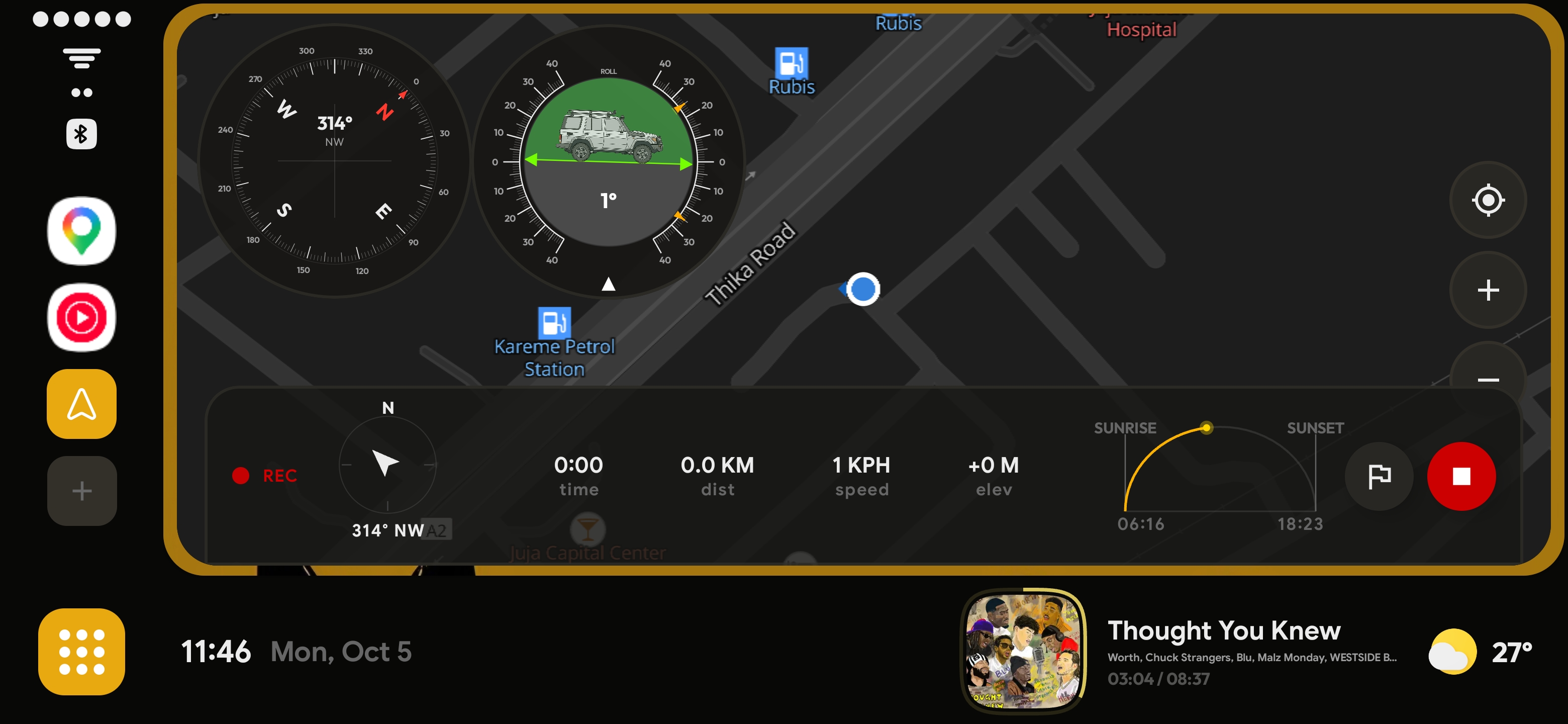
Car dashboard Split view with media controls and live weather, GPS speedometer, trip recording and favourite places.
Make it yours Accent colours, wallpapers, icon packs, dark or light maps, and left or right-hand drive layouts.
Privacy first Search and routing run on your device. Location only leaves it for weather updates.
Screenshots
View allMissing your region?
66 regions are available, including the US, UK, Germany, France, India, Brazil, Australia, Japan, and more. New ones are added based on requests, and the app notifies you when yours is ready.
Most requested: GhanaCanadaIvory Coast
Request a region Latest release
v2.3.0 · Oct 28, 2001 NEW Japanese (日本語) language support — full app translation
NEW Language picker as first item in Settings (System / English / 日本語)
NEW Buttery GPS puck & camera, Google Maps-style breathing animation
NEW Camera perspective toggle: North Up / Heading Up with tilt
Full changelog Quick answers
Do I need internet to navigate?
Only once, to download your region. After that, search, routing and voice guidance all work offline. Weather is the only feature that uses a connection.
My country is not listed. What can I do?
Send a region request. Popular requests get added first, and the app notifies you when your region becomes available.
Will it run on my car head unit?
It is built for Android head units, dashboard tablets and phones. Since v1.3.0, 32-bit ARM units (Allwinner, Rockchip) are supported too.
How do I make it my home screen?
Open Android Settings, Apps, Default apps, Home app, and choose Mini AA Pro. On some head units this is under the launcher or car settings.
Is it a subscription?
No. It is a one-time purchase with no ads, and map updates are free.
What data does it collect?
No accounts, analytics or ads. Your location stays on the device except for weather updates.
Can I use it in a right-hand drive car?
Yes. Switch between left-hand and right-hand drive layouts in the customization settings.
Where do the maps come from?
Maps are built from OpenStreetMap data, and routing is powered by Valhalla.
How do I set Mini AA Pro as the default launcher on my head unit?
On most head units, go to Settings > Apps > Default Apps > Home App (or Launcher) and select Mini AA Pro. The exact path varies by manufacturer. Some head units use a separate Launcher settings menu. If you do not see this option, your head unit may require ADB or a third-party default app manager.
Why does the media player show nothing even though music is playing?
The media player requires notification access to detect what is playing. Go to Settings > Apps > Mini AA Pro > Notification Access (or Special App Access > Notification Listener) and enable it. Once granted, the media player will pick up any music playing on your device.
How does offline navigation work?
No internet connection is needed while driving. Download your region map pack over Wi-Fi ahead of time and all routing, turn-by-turn directions, and rerouting happen entirely on-device. Internet is only used for weather updates, map region downloads, and account verification.
Can I use compass and clinometer widgets without a map installed?
Yes. The built-in gauge widgets (compass, clinometer, G-Force, altitude, and clock) work entirely from your device sensors and GPS. They do not require a map pack to be downloaded.